PDF Duo › Read like a book
Read a PDF like a book on iPhone Duo
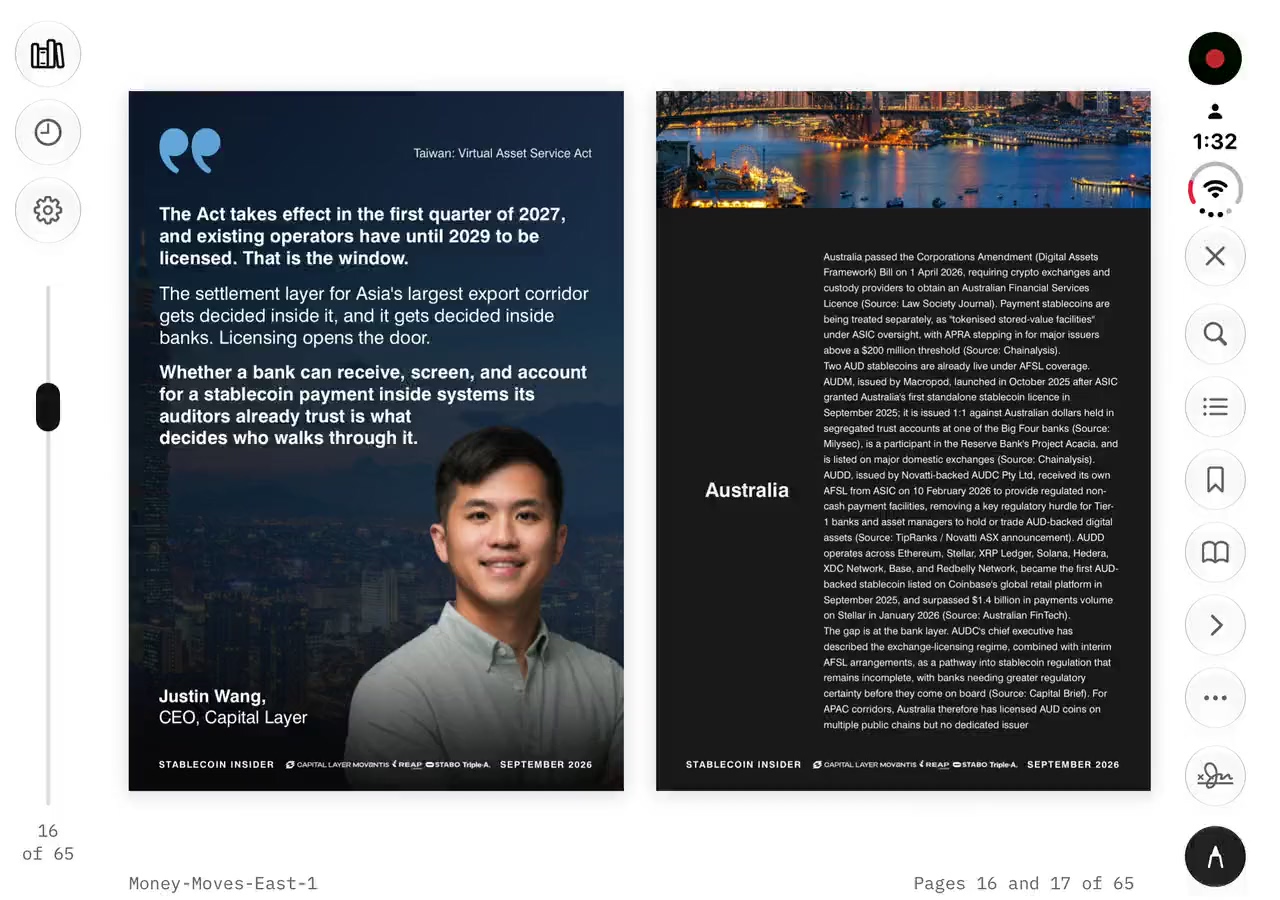
Open your iPhone Duo and PDF Duo shows two pages at once, with the spine on the real hinge; the cover stands alone on the right, then pages 2–3, 4–5, and pages turn with a real page curl under your finger. It’s free, with no account.
Updated 27 October 2026
How to read a PDF as a book
- Open the PDF in PDF Duo: from the Library, or with Open in PDF Duo from Files, Mail, Safari or Messages.
- Open your iPhone Duo and turn it on its side. Two pages sit across the fold, with no bar across the top.
- Drag a page toward the spine and it curls over under your finger, like paper; or tap the outer edge of a page to turn it.
- Fold, unfold or rotate whenever you like: you stay on the same page.
A real page curl for PDFs on iPhone
The page curl is the default page turn, and it works in every pose, not only open as a book. Flip (a stiff page turning on the hinge) and Fade are there as settings.
With Reduce Motion on, pages fade instead of curling.
Laid out like a printed book
The cover stands alone on the right, then 2–3, 4–5, so pages that were designed to face each other do. Pinch to zoom into any page; pinch in and the page becomes selectable, so you can copy its text.
Your place, remembered
PDF Duo reopens every document where you left off. It opens your PDFs where they are, in iCloud Drive or any folder you connect once, so there is nothing to import first.
Search finds any word and lists every match with its line; the PDF’s own contents and your bookmarks are a tap away.
Questions
Can I turn off the page curl?
Yes. Choose Flip or Fade in the settings. With Reduce Motion on, pages fade.
Why does the cover stand on its own?
As in a printed book: the cover sits alone on the right, so pages 2–3, 4–5 face each other the way they were designed.
Can I select text in the two-page view?
Pinch in and the page becomes selectable. The spread itself shows the pages for reading.
Is it different from the iPhone Duo’s built-in two-page view?
Quick Look shows two pages and Markup. PDF Duo adds the page curl over the spine, your place remembered in every document, saved signatures, form filling field by field and a laptop pose for signing.
Is it free?
Yes. Reading, mark-up, form filling, signing and flattened export are all free, with no ads, no watermark, no account and no subscription.

Free on the App Store. Free · No ads · No watermark · No account