PDF Duo › Every pose
A PDF app for every iPhone Duo pose
PDF Duo fits each way you hold the iPhone Duo: closed, you read with one hand and the buttons stand in the Duo’s own control column; open as a book, two pages sit across the fold; open upright, one large page; and half open like a laptop, the page stands above the fold with thumbnails, or the signature pad, below.
Updated 27 October 2026
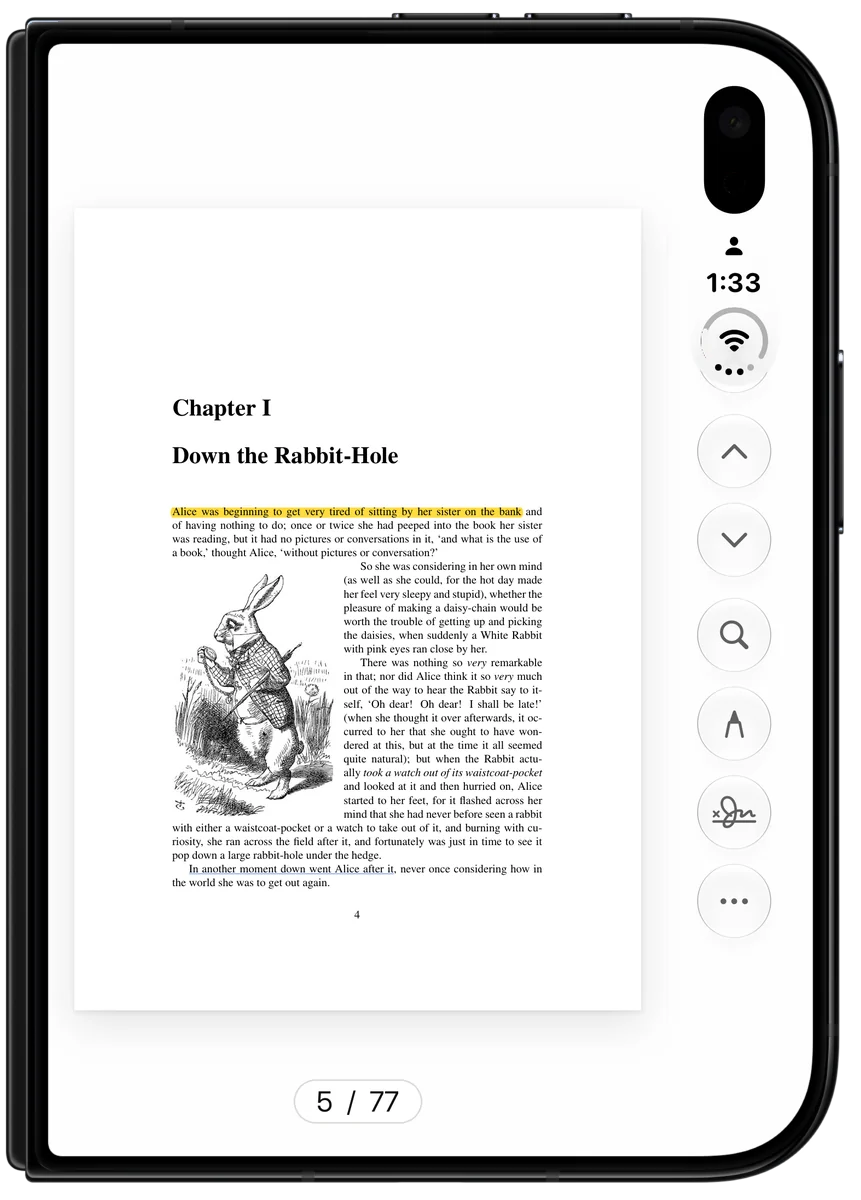
Closed
Read on the outer screen with one hand. Every button stands in the Duo’s own control column beside the clock, so nothing sits under the camera.
Open as a book
Turn the open Duo on its side: two pages across the fold with the spine on the hinge, a page curl over the spine, and no bar across the top, so the pages get the full height.
Open upright
One large page, with a thumbnail rail under your thumb.
Half open, like a laptop
The page stands above the fold, with every page as a thumbnail below. Sign, and the signature pad lies flat under your hand.
Fold mid-task
Fold or rotate mid-document and you stay on the same page, with the same document and the same edit.
Compare two PDFs across the fold
Choose Compare with… on a document in the Library, pick the second one, and the two sit side by side across the fold, scrolling together. It shows them side by side; it doesn’t mark the differences.
Questions
Does it work when the Duo is closed?
Yes. Closed, you read with one hand, and the buttons stand in the Duo’s own control column beside the clock.
What happens when I fold or unfold mid-document?
You stay on the same page, with the same document and the same edit.
Does it work on other iPhones and on iPad?
Yes. PDF Duo is designed for iPhone Duo and foldable iPhones, and works on every other iPhone and on iPad too.
Does it support Apple Pencil on iPhone Duo?
Not yet.

Free on the App Store. Free · No ads · No watermark · No account